

10 Best Payroll Software for Accountants (2026 Guide)

The best payroll software for accountants in 2025 depends on a firm’s client mix and service model. For firms that need deep accounting integrations, Gusto is a top choice, while Bolto excels for those serving startups that also require hiring and global EOR tools. Ultimately, the best platform turns the pressure of managing taxes, benefits, and compliance into predictable workflows, gives clients clean outputs, and keeps the firm out of penalty territory.
This guide explains how firms deliver payroll services, how to evaluate vendors, and which features matter most in 2025. If your firm also supports startup founders who want recruiting plus payroll in one place, take a look at Bolto, a single platform for recruiting, US payroll, global EOR, and contractor payments.
Service delivery models, how accountants run payroll
Firms typically choose one of three models, sometimes mixing them by client tier.
- Advisor model, the software is in the client’s name. The firm sets the chart of accounts, trains the client, and reviews monthly.
- Managed model, the firm owns the process and platform, runs payroll end to end, and bills for the service.
- Co managed model, the firm handles setup, taxes, and tricky items while the client runs cycles and approvals.
Practical compliance reminders that shape the model in 2025
- Forms W 2 and W 3 must be filed with the Social Security Administration and furnished to employees by January 31 each year. As of 2024, employers filing 10 or more information returns must e file. (irs.gov)
- Form 1099 NEC for contractor pay is due to the IRS and to recipients by January 31. (irs.gov)
- Federal new hire reporting is due within 20 days of hire, some states require sooner. (acf.gov)
When evaluating the best payroll software for accountants, make sure the vendor can bake these rules into everyday workflows.
How we picked the software on this list, methodology
Selection criteria used by firms that live in payroll
- Core compliance coverage, accurate tax engines for federal, state, and local, plus automatic updates. Federal deposits must be electronic through EFTPS, so we favor platforms that reconcile EFTPS confirmations inside the app. (irs.gov)
- Deadline support, built in tasks and e filing for W 2, W 3, and 1099 NEC at the January 31 deadline. (irs.gov)
- Accountant experience, bulk actions, client dashboards, user roles, and review queues instead of single company views.
- Contractor and employee coverage in one flow, since many clients mix W 2 and 1099 workers.
- Security posture, SOC 2 program and strong access controls.
- Support and SLAs, named contacts for firms and clear turnaround times.
If your client base skews to startups, also consider whether the vendor pairs payroll with recruiting and global hiring. This is where Bolto is notable, since firms can help clients source engineers globally, then onboard as contractors or employees, and run US payroll in the same system.
Top 10 Best Payroll Software for Accountants in 2025
Building on the fundamentals above, this section zeroes in on the payroll platforms accountants rely on to run accurate, compliant, multi-client payroll at scale in 2025. We grouped these ten because they pair strong compliance automation with accountant-focused workflows, including bulk processing, delegated access, deep accounting integrations, and responsive support. Use this shortlist to map client profiles (startup, nonprofit, or multi-state employer) to the software that saves time without sacrificing precision.
1. Bolto Payroll
For startup-heavy firms juggling W-2s, 1099s, and the occasional global hire, Bolto’s pitch is a unified payroll hub that scales from a Delaware C-corp’s first pay run to multi-entity coverage. It automates federal/state tax filing, streamlines year-end forms, and layers in benefits, PEO, and broad EOR options, which is handy when a client expands overseas. If you’re planning multi-country payroll, see our multi-country payroll solutions guide.

- Pricing: Launch $59 base + $39 per employee/month; Scale $99 + $49; EOR from $599 per employee/month.
- Accountant-grade highlights:
- Automated federal/state payroll taxes with W-2/1099 year-end processing.
- Multi-state compliance built for distributed teams.
- Employees and contractors paid in one workflow; Contractor Management and CoR.
- Global/EOR coverage in 150+ countries inside the same platform.
- Reports and exports; Scale adds Reports Export and enterprise-grade custom integrations.
- Benefits and PEO options; dedicated onboarding for fast go-live.
- Pros: Published pricing across U.S., EOR, and contractor options; strong automation for taxes and year-end; fast setup with a dedicated support rep and enterprise integration options.
- Cons: Accounting integrations aren’t publicly listed; tier-gated features; no formal accountant partner program yet.
- Bottom line: A startup-centric all-in-one with credible EOR breadth. This is great when your clients go global, less ideal if you require a mature accountant program and named GL integrations.
2. Gusto
If your firm runs on QuickBooks or Xero and needs repeatable, multi-client payroll with very little hand-holding, Gusto hits the sweet spot. The Gusto Pro partner program adds a multi-client dashboard, firm- or client-billed options, discounts/revenue share, and guided migrations. Day-to-day, you get full-service filings, unlimited next-day runs, and role-based controls; for global needs, Gusto handles contractor payouts in 120+ countries and offers optional EOR hiring via Gusto Global.

- Pricing: Simple $49 base + $6 per employee/month; Plus $80 + $12; Premium $180 + $22.
- Accountant-grade highlights:
- Full-service tax filing plus automated W-2/1099 year-end.
- Multi-state payroll (Plus/Premium); AutoPilot, off-cycle, and bonus runs.
- Custom roles, approvals, and searchable audit trails for segregation of duties.
- Direct GL sync to QuickBooks Online and Xero; CSV exports.
- Global contractor payments (120+ countries) and optional EOR hiring via Gusto Global.
- Flexible reporting by client/entity, department, and location.
- Pros: Accountant program with revenue share/discounts; unlimited runs and automated filings; responsive support and smooth QBO/Xero syncing.
- Cons: Multi-state and faster funding often require Plus/add-ons; limited native ERP integrations; EOR country list still expanding.
- Bottom line: The accountant-friendly default for QBO/Xero shops, as it is fast to standardize, easy to scale, and simple to support.
3. RUN Powered by ADP
For firms managing dozens of U.S. SMBs, RUN pairs ADP’s compliance engine with Accountant Connect, a free console that centralizes client access, GL mapping, reports, and notices. Payroll is full-service across all states, with W-2/1099 e-filing and AI checks that flag issues before approval. Time, benefits, and a deep Marketplace round out the ecosystem; WorkMarket assists with contractor onboarding and payment.

- Pricing: Quote-based (base + per-employee/per-run). Tax filing included; add-ons for Time, benefits, EWA.
- Accountant-grade highlights:
- Automated federal/state/local filings with W-2/1099 e-file.
- Accountant Connect: multi-client dashboard, scheduled reports, GL tools.
- Direct journal posting to QuickBooks Online/Desktop and Xero.
- AI error detection, RUN & DONE autopilot, and 24/7 support.
- Contractor payments; expand via WorkMarket and Marketplace partners; EOR via partners.
- Pros: Free accountant console; deep multi-state automation; broad support and integrations.
- Cons: Unpublished pricing and per-run fees can reduce predictability; advanced approvals/NetSuite often need higher tiers or partners; global/EOR is partner-led, not native.
- Bottom line: A compliance workhorse with a real accountant cockpit, which is ideal when you value control and coverage over list-price transparency.
4. QuickBooks Payroll
When your entire client base already lives in QuickBooks Online or QuickBooks Ledger, staying native keeps payroll, time, and books tightly aligned. QuickBooks Payroll layers in full-service filings, Auto Payroll, and same-day direct deposit on higher tiers. The QBOA connection streamlines provisioning, billing, and visibility; just remember this is a U.S. play with limited non-Intuit exports.
- Pricing: Core $50 + $6.50 per worker/month; Premium $88 + $10; Elite $134 + $12; extra state fees on Core/Premium.
- Accountant-grade highlights:
- Automated federal/state payroll taxes with W-2/1099 e-filing.
- Multi-state compliance; surcharges on lower tiers.
- Auto Payroll, off-cycle runs, and same-day/next-day deposit options.
- Timesheets via QuickBooks Time (Premium/Elite) with approvals and job costing.
- GL mapping to custom accounts; class/project allocations.
- Contractor payments and 1099 e-file; robust client/entity reporting.
- Pros: Deep QBO/QBOA integration; automation plus Auto Payroll; fast funding options.
- Cons: Per-state surcharges on Core/Premium; U.S.-only; no direct Xero/NetSuite export.
- Bottom line: The obvious choice for QBO-standardized firms, but be sure to watch state fee creep and plan around Intuit-centric integrations.
5. SurePayroll
For firms that operate like a payroll bureau, SurePayroll (a Paychex company) brings a white-label client portal, wholesale pricing, and a multi-client dashboard. It’s designed for high-volume, small-employer payrolls with full-service tax filing and year-end forms baked in. The Accountant Care Team and free onboarding make migrations painless, while GL exports and time-clock integrations keep books tidy.

- Pricing: From $29 base + $7 per employee/month (Full Service); DIY from $20 + $4; multi-state and year-end add-ons may apply.
- Accountant-grade highlights:
- Accountant/Reseller edition with branded portals and wholesale billing.
- Automated federal/state/local filings; W-2/W-3 and 1099-NEC included.
- Multi-state support; optional add-ons for additional jurisdictions.
- Unlimited runs; free two-day ACH with optional same- or next-day processing.
- Role-based access so firm or client can run payroll with an audit trail.
- GL mapping/exports plus SMB-friendly time integrations.
- Pros: Bureau-style white-labeling; multi-client dashboard; dedicated support and low entry price.
- Cons: U.S.-only with no EOR/global; add-ons can stack; same-day/next-day funding varies by eligibility.
- Bottom line: A budget-friendly bureau model that scales across many tiny clients. This model is best when international needs are off your plate.
6. OnPay
OnPay is the tidy, transparent option accountants love for small and midsize clients. You get a clean multi-client dashboard, granular permissions, and full-service filings with year-end forms included. GL exports to QuickBooks and Xero are flexible, and partner perks (free firm payroll, revenue share/discounts) sweeten the deal, but note that it is U.S.-only and time tracking lives in integrations.

- Pricing: $49 base + $6 per worker/month. Filings and W-2/1099 included; multi-state supported.
- Accountant-grade highlights:
- Automated tax filing and payments with W-2/1099 included.
- Multi-state payroll at no extra state fee; unlimited and off-cycle runs.
- Two- to four-day deposit timing (risk-based); bonuses supported.
- Approvals, granular permissions, and audit logs with collaborator access.
- GL mapping/journal exports for QuickBooks Online/Desktop and Xero.
- Reporting by client, department, and location with easy CSV/PDF exports.
- Pros: One straightforward plan with filings included; excellent GL mapping; partner program with free firm payroll and priority support.
- Cons: U.S.-only with no EOR/global; no auto-run; 2- to 4-day funding; slimmer integration catalog.
- Bottom line: Simple, accurate, and accountant-friendly, making it ideal when you value clarity and control over an oversized app marketplace.
7. Paychex Flex
Paychex Flex blends proven compliance with partner tools that help firms manage many SMBs at once. Partner Pro surfaces client health, missing data, and approvals; employee Pre-Check helps catch mistakes before payday. With strong GL integrations (including NetSuite and Sage Intacct), same-day ACH, and 24/7 support, it’s well-suited to distributed, multi-entity clients that need rigorous controls.
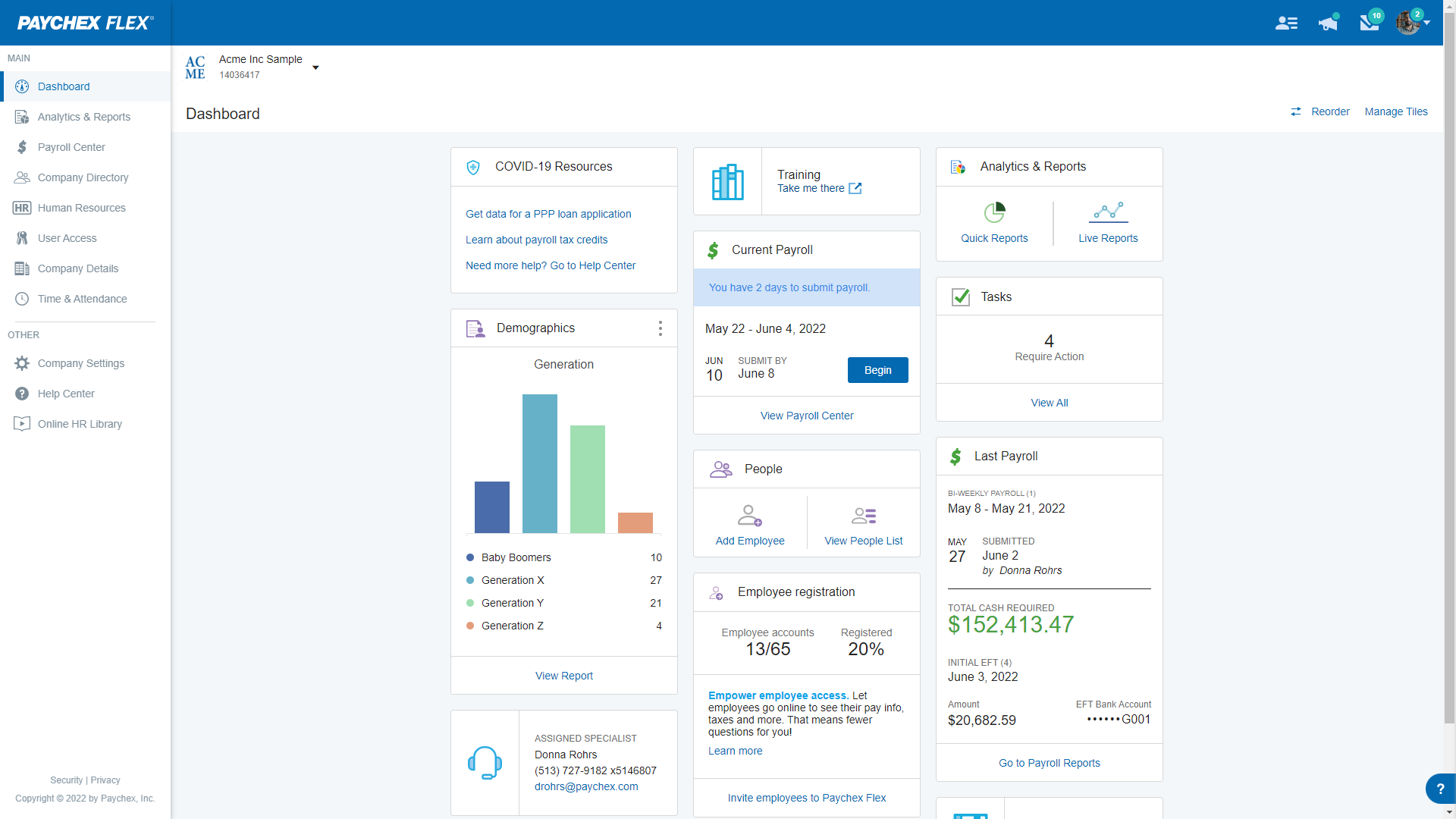
- Pricing: From $39/month + $5 PEPM; higher tiers are quote-based; add-ons/filings may add cost.
- Accountant-grade highlights:
- Automated payroll taxes and multi-state compliance across federal, state, local.
- Year-end W-2 access and 1099-NEC prep/e-file.
- Unlimited runs, off-cycle and bonus runs, and same-day ACH.
- Role-based approvals, granular permissions, audit trail, and Pre-Check.
- GL mapping/exports to QuickBooks, Xero, NetSuite, Sage Intacct.
- Partner Pro console for multi-client monitoring and collaboration.
- Pros: Robust compliance engine; partner console enhances oversight; wide GL integrations plus 24/7 help.
- Cons: Quote-based pricing beyond entry level; add-ons can stack; global/EOR typically partner-sourced, not native.
- Bottom line: A dependable, compliance-first platform with serious accountant tooling that is strong for firms that need breadth and guardrails.
8. Rippling
Rippling caters to firms and clients that want payroll, HR, IT, and finance automation under one roof. Accountants get multi-org controls for separate EINs, bank accounts, and filings, plus granular approvals and a full audit trail. It handles U.S. W-2/1099 automation with deep GL syncs (QuickBooks, Xero, NetSuite), and offers global contractor pay, EOR, and select native Global Payroll for distributed teams.

- Pricing: From $8 per user/month + ~$40 base; modular add-ons; Global/EOR pricing is quote-based.
- Accountant-grade highlights:
- Automated tax filing, W-2/1099 year-end, new-hire reporting, ACA support.
- Multi-state compliance plus multi-entity/EIN management with separate funding.
- Unlimited and off-cycle runs; next-day options and easy corrections.
- Role-based approvals and comprehensive audit trails across orgs.
- GL mapping and journal syncs for QuickBooks, Xero, and NetSuite.
- Contractor pay, EOR, and selective Global Payroll with robust reporting.
- Pros: Strong automation and GL depth; multi-EIN controls; evolving partner tools.
- Cons: Costs climb with modules; native Global Payroll coverage is selective; global pricing varies and is often quote-based.
- Bottom line: Powerful when you’re standardizing operations beyond payroll; plan the stack carefully to avoid modular cost creep.
9. Patriot Payroll
Patriot is the low-friction, low-cost option for firms managing many micro-businesses. Its Partner Program delivers umbrella login, consolidated billing, partner-only reports, and onboarding help. Full-Service automates filings and year-end forms across all states, while QuickBooks-centric GL mapping keeps the close simple for bookkeepers.
- Pricing: Basic $17 base + $4 per worker/month; Full-Service $37 + $5; additional states $12/month each.
- Accountant-grade highlights:
- Full-Service automates federal/state/local filings and W-2/W-3 year-end.
- Multi-state coverage in all 50 states with per-additional-state fees.
- Unlimited runs, Auto Payroll, and free two-day ACH.
- GL mapping; QuickBooks Online sync, QuickBooks Desktop IIF, and CSV.
- Partner features: umbrella login, partner reports, consolidated billing.
- Contractor pay with direct deposit and 1099 e-file (Full-Service).
- Pros: Very affordable; unlimited payrolls; partner tooling and U.S.-based support; filing guarantee.
- Cons: Limited native integrations beyond QuickBooks; extra-state fees can add up; U.S.-only with no EOR.
- Bottom line: A cost-effective workhorse for micro-SMB books. Maximize savings by standardizing on QuickBooks and planning for extra-state fees.
10. BrightPay
For UK and Irish bureaus, BrightPay is built around accountant workflows: RTI and HMRC compliance, payrolling benefits, auto-enrolment, CIS (UK), and well-structured approvals with audit trails via Connect. Journals export cleanly to Xero, QuickBooks, and Sage. Note the product transition: desktop retires after 2025/26, with a new cloud app becoming the default.
- Pricing: From £369/year (desktop); £1,589/year for unlimited; Connect priced per active employee; cloud-only from 2026/27 (see pricing calculator).
- Accountant-grade highlights:
- HMRC compliance with RTI, payrolling benefits, and P60/P11D automation.
- Client approvals and time-stamped audit trails in Connect.
- Auto-enrolment files for major pension providers (NEST, People’s, Smart, etc.).
- GL mapping by department/cost centre with exports to Xero, QuickBooks, Sage.
- CIS tools (verify subcontractors, statements, CIS300), with the feature on desktop first and cloud following.
- Built-in payments via Modulr and customizable reports.
- Pros: Bureau-grade workflows; deep UK compliance; strong ledger journals and native payments.
- Cons: UK/Ireland-only; desktop sunsets after 2025/26; early cloud versions may lack CIS initially; licensing model is changing.
- Bottom line: The accountant’s choice for UK/IE bureaus, so you should plan your migration path now as BrightPay completes its cloud transition.
How to choose the best payroll software for accountants, buying criteria
Use this checklist to avoid buyer’s remorse.
- Accuracy and penalties, ask how the system enforces deposit schedules and catches late deposits. Failure to deposit penalties range from 2 percent to 15 percent based on days late, so alerts and next day rules really matter. (irs.gov)
- Tax scope, confirm federal, state, and local for every state where you or your clients have employees. Verify FUTA handling and credit reduction state logic. The standard FUTA rate is 6 percent on the first 7,000 dollars of wages with a typical credit up to 5.4 percent, net 0.6 percent for most employers. (irs.gov)
- Deadlines and e file, verify the January 31 flows for W 2 and 1099 NEC, and that e file is supported when you have 10 or more information returns. (irs.gov)
- Contractor support, contractors paid on time with Form 1099 NEC generation, multi currency if needed for global freelancers.
- Accountant controls, role based approvals, bulk edits, task lists, and exportable journal entries.
- Security, SOC 2 and MFA by default. Microsoft data shows MFA blocks the vast majority of account compromise attempts. (microsoft.com)
- Client size fit, startups need speed and basics, mid market clients need deeper reporting and integrations.
If you are shortlisting for startups, the best payroll software for accountants is often the product that couples clean payroll with recruiting and simple benefits. That combination gets founders live quickly and limits tool sprawl. See how Bolto combines recruiting, US payroll, global EOR, and contractor payments.
Integrations that matter to firms
- General ledger and close, map every earning, tax, benefit, and journal to the right GL accounts. The best payroll software for accountants exports clean entries by pay run and by period.
- Time and attendance, hourly clients need precise accruals and overtime checks.
- HRMS and onboarding, new hire reporting needs to flow from onboarding since federal rules require reporting within 20 days. (acf.gov)
- Payments and banking, modern payroll leans on ACH direct deposit. Recent surveys show about 92 to 93 percent of US workers are paid by direct deposit, so first class ACH is table stakes. (nacha.org)
- Contractor payments and invoicing, unified with employee payroll so firms do not reconcile two systems.
Accountants working with high growth startups can point clients to Bolto for unified US payroll and contractor payments plus global EOR when teams expand internationally.
Reporting and analytics trends
- Workforce and cost visibility, pay run cost by department, location, and project so clients see unit costs without spreadsheet gymnastics.
- Payroll readiness dashboards, exceptions to catch before submission, for example missing I 9, invalid bank info, ACH cutoffs.
- Compliance telemetry, W 2 and 1099 filing status, deposit confirmations, new hire reporting status, and alerts tied to the firm dashboard.
- ACA and benefits tracking for ALE clients, employers with 50 or more full time equivalents must file Forms 1094 C and 1095 C and furnish Form 1095 C to full time employees on the IRS schedule. The best payroll software for accountants should make this mostly push button. (irs.gov)
Value, partner, and referral programs for accounting firms
What to look for
- Firm console and multi client pricing that improves as you add clients.
- White label reports and co branded compliance reminders for W 2, 1099, and ACA cycles.
- Referral revenue or implementation credits that can offset onboarding work.
- Priority support queues and a named partner manager.
Firms that support venture backed startups can add value by offering recruiting plus payroll as a packaged service. You can route clients to Bolto and stay the ongoing advisor on policy, time off, and reporting.
Match software to firm size and client mix
- Solo or very small firms, choose simplicity, sensible defaults, and GL exports that require minimal adjustments. The perceived best payroll software for accountants at this tier is the one that a single staffer can run across many small clients.
- Growing firms with mixed clients, look for robust approval flows, bulk actions, and ACA reporting for clients that cross the 50 full time equivalent threshold. (irs.gov)
- Startup heavy firms, prioritize fast onboarding, contractor payments, and recruiting tie ins. This is an area where Bolto can streamline tool sprawl for founders.
Security, compliance, and hosting considerations
Non negotiables for any vendor that wants firm trust
- Independent assurance, SOC 2 based on the AICPA Trust Services Criteria covering security, availability, processing integrity, confidentiality, and privacy. Security is the only mandatory category in every SOC 2 report. (aicpa-cima.com)
- Account protection, multi factor authentication should be on by default. Microsoft reports that MFA can block more than 99 percent of account compromise attempts. (microsoft.com)
- Least privilege access and audit logs for every payroll change.
- Data residency and backup posture documented in the contract and partner program.
Pricing models, hidden costs, and key contract terms
Where firms get tripped up. For a deeper breakdown of typical fees and gotchas, see our payroll services pricing guide.
- Per employee per month fees plus a platform fee are common. Confirm whether contractor only clients are priced differently.
- Year end filings, some vendors charge extra for W 2 and 1099 packages, e file, and corrections. Confirm the cost per form and what happens at reprint time.
- FUTA and SUI handling, verify the FUTA wage base and the standard rate of 6 percent with the potential 5.4 percent credit, and how credit reduction states are calculated and surfaced in the app. (irs.gov)
- Overtime logic, know the current federal exemption thresholds and whether state rules override. The Department of Labor finalized salary level increases that took effect in 2024 and scheduled another change for 2025, and parts of the rule have faced legal challenges, so your software should update as rules evolve. (dol.gov)
- Term length and exit, look for month-to-month with clean data export.
A simple 5 step buying process for firms
- Define the client profile, states, pay types, benefits, contractors, and need for ACA or global. For startup heavy books, shortlist platforms that combine recruiting and payroll like Bolto.
- Run a real pilot, two clients, at least two cycles, and include one with multi state employees. Validate electronic deposits and EFTPS confirmations in the record. (irs.gov)
- Test year end, generate draft W 2 and 1099 NEC, confirm January 31 workflows and e file readiness for 10 or more information returns. (irs.gov)
- Review security, request a current SOC 2 report and confirm MFA enforcement. (aicpa-cima.com)
- Lock pricing and scope, document fees for filings, corrections, and off cycle runs.
Implementation and client rollout playbook
- Project plan, pick a go live month and keep onboarding windows tight.
- Data prep, validate worker status, wages, PTO balances, and benefit deductions.
- Compliance setup, deposit schedules, filing authorizations, and new hire reporting automations since federal law sets a 20 day window. (acf.gov)
- Parallel runs, at least one clean run side by side before flipping the switch.
- Client training, payroll calendar, approvals, and how to handle off cycle payments.
- Close the loop, verify tax deposits, quarter end returns, and that Forms W 2 and 1099 NEC will generate on the January timeline. (irs.gov)
Conclusion
The best payroll software for accountants in 2025 is the platform that quietly eliminates penalties, simplifies filings, and gives firms a repeatable playbook. Focus on compliance automation, accountant grade controls, and integrations that reduce reconciliation time. For startup heavy firms that want recruiting plus payroll and global hiring support, consider Bolto. If you want one vendor for recruiting, US payroll, contractor payments, and global EOR with founder-friendly support, book a quick demo at Bolto and browse our customer stories.
FAQ
What makes the best payroll software for accountants different from small business payroll tools
Accountant platforms add multi client consoles, bulk actions, review queues, and deeper compliance automation. They also support firm level roles and reports that small business tools do not.
What deadlines should my firm prioritize inside the software
Mark January 31 for W 2 and 1099 NEC filing and furnishing, verify e file for 10 or more information returns, and confirm electronic deposits through EFTPS on the right schedule. (irs.gov)
How important is direct deposit reliability
Very important. Recent surveys show about 92 to 93 percent of US workers are paid by direct deposit, so reliability and clear ACH cutoff times are critical. (nacha.org)
What penalties are common when payroll goes wrong
Failure to deposit penalties start at 2 percent and can reach 15 percent depending on how late the deposit is. Good software prevents these with alerts and correct deposit scheduling. (irs.gov)
Do I need SOC 2 from my payroll vendor
Yes, SOC 2 provides independent assurance over security, availability, processing integrity, confidentiality, and privacy. Security is mandatory in every SOC 2 report. (aicpa-cima.com)
How does ACA reporting affect my software choice
If you have clients that are Applicable Large Employers, generally 50 or more full time equivalents, your software should produce Forms 1094 C and 1095 C and track furnishing and filing deadlines. (irs.gov)
What about overtime rule changes in 2024 and 2025
The Department of Labor finalized higher salary thresholds for exemptions with dates in 2024 and 2025 and legal challenges have followed. Choose software that updates quickly and flags potential reclassification risk. (dol.gov)
Can one platform cover recruiting, payroll, and global hiring
Yes. For startup clients, a combined stack can speed hiring and reduce tool sprawl. If that fits your book, explore Bolto, which unifies recruiting, US payroll, contractor payments, and global EOR.